
A product feed is a file that lists every product in an online store together with its attributes, so that sales and advertising channels like Google Shopping and Meta can show those products in ads. The attributes vary by channel, but the most common are:
- Title
- Description
- Price
- Category
- Availability
- Image(s)
The feed collects all of these products and attributes in a single file. The most common formats are XML and CSV, but TXT and TSV files exist too. An example XML product feed for Facebook could look like this:
<rss xmlns:g="http://base.google.com/ns/1.0" version="2.0">
  <channel>
    <title>Facebook product feed</title>
    <item>
      <g:id>1</g:id>
      <g:title>A Hoodie With Logo</g:title>
      <g:description>This is a simple product with a simple description.</g:description>
      <g:availability>in stock</g:availability>
      <g:condition>new</g:condition>
      <g:price>50.00 USD</g:price>
      <g:link>https://feedr.com/products/hoodie-with-logo</g:link>
      <g:image_link>https://feedr.com/images/hoodie-with-logo.jpeg</g:image_link>
      <g:brand>ACME</g:brand>
      <g:shipping>
        <g:country>US</g:country>
        <g:service>DHL</g:service>
        <g:price>5.00 USD</g:price>
      </g:shipping>
      <g:product_type>Clothing > Hoodies</g:product_type>
      <g:google_product_category>166</g:google_product_category>
      <g:fb_product_category>458</g:fb_product_category>
    </item>
  </channel>
</rss>
A product feed also goes by other names, such as data feed, product data feed, catalog, product catalog or dynamic product feed. They usually refer to the same thing.
What is a Product Feed Used For?
Product feeds are used by sales and marketing channels. If you want more sales, you need to be present where your customers are. On platforms such as Google and Facebook, among many others, you can show your products in ads like Google Shopping or the Facebook feed. See all the channels Feedr can send your feed to.
This only works when the channel knows what inventory you have. The product feed gives it that insight, so it knows which products to show to which user. These ads are called Dynamic Product Ads (DPA), because they show product information that changes with your catalog. That information comes from the feed you have connected to the channel.
How do I Create a Product Feed?
You can create a product feed yourself by entering the values into a file or a spreadsheet, but it isn't recommended. Entering the values by hand takes a long time, and even if your shop system can export the file, you still need to keep it up to date.
Imagine that one of your products sells out. The file you created would still show the item as available, so the ad keeps showing it to customers who can't buy it. That causes two problems. First, it's a bad experience for the customer, who came to your site for a product they can't buy. Second, you pay to promote an item that's out of stock instead of spending your budget on products you can actually sell.
Product Feed Management Platforms
To avoid outdated data, most stores use a platform to manage their product feeds. The platform connects to your e-commerce system, extracts the product information and keeps it up to date, so your DPAs don't show wrong information.
Update Time
As mentioned above, a short update time matters a lot. Many product feed platforms don't update your products often by default. Modern shop systems such as Shopify and WooCommerce allow a direct integration, which means the feed platform knows immediately every time a product is created, updated or deleted. For simpler integrations such as XML or CSV, the feed needs to be fetched often to avoid stale data. Many product feed platforms only fetch once a day, or charge extra for more frequent updates.
Product Filtering
The platform should also let you control which products go into each feed. Sometimes you want to leave certain items out, for example products with a low profit margin, or items like gift cards that aren't meant to be advertised on a sales channel. See how product filtering works in Feedr.
Product Enrichment
Another feature a platform might offer is enriching the product information from your shop. The more correct information you give the sales channels, the better their algorithms can work. Read more about customizing your product feeds. A good place to start is your titles, so here's how to optimize Google Shopping product titles.
Product Categories
Sales channels use a category system to know what you're selling. Both Facebook and Google have their own system of product categories, also called a product taxonomy, which is a field in the product feed. It helps the channels identify your products correctly, which they use to decide when to show your ads and which category-specific attributes to expect.
Shipping Options
Besides categories, you can also enrich your feed with shipping options. This is especially helpful for Google Shopping ads and price comparison sites, since they can show the information in the ad itself. Your feed management platform should let you set shipping rates and carriers dynamically, so you can for example use different rates per country or offer free shipping above a certain price, without changing anything in your shop.
How to Increase the ROAS of Dynamic Product Ads?
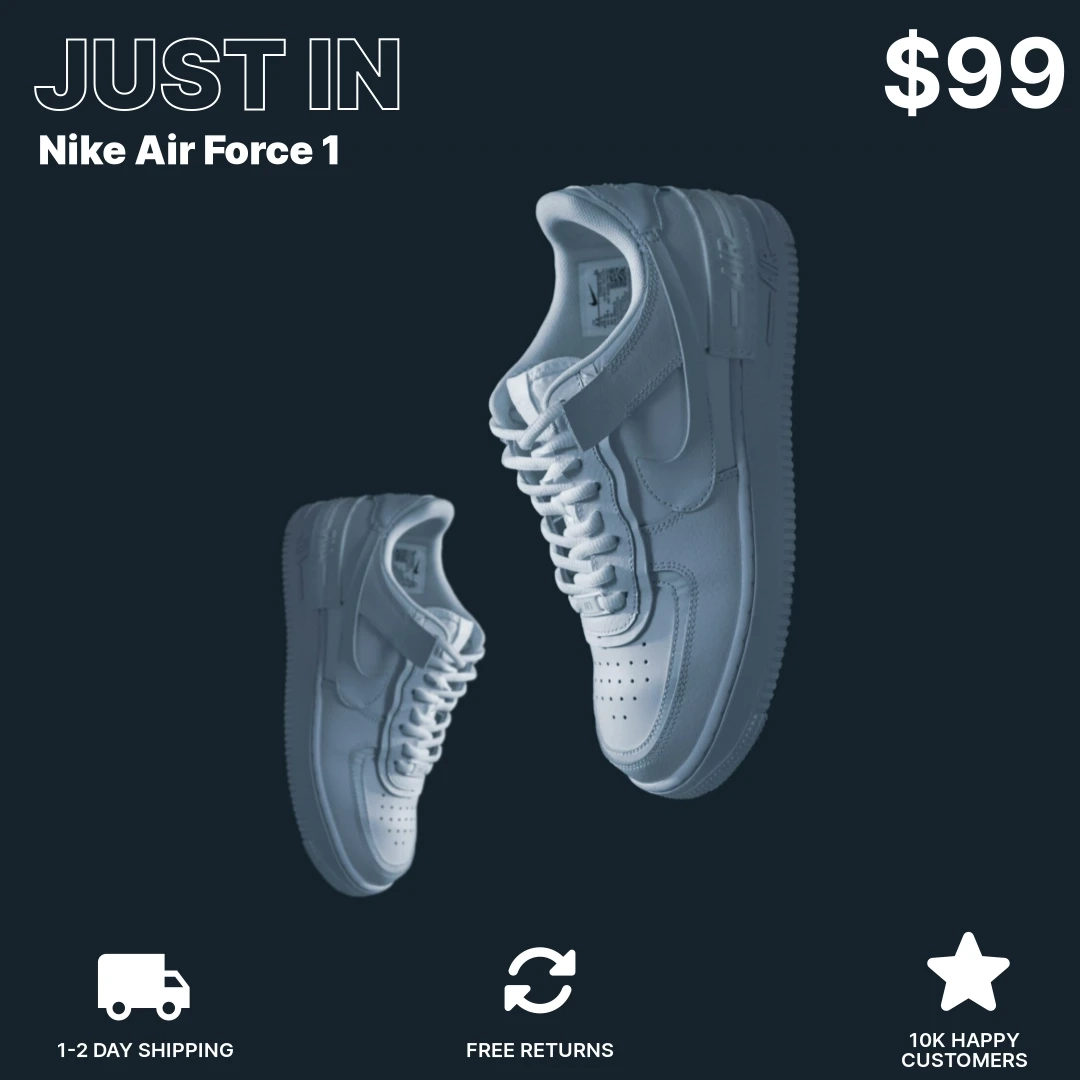
On channels such as Facebook, Instagram and Pinterest, the competition for attention is fierce, so it's important to get the most out of your ads. One way is to make your creatives more eye-catching.
You can show information about the product, such as its price or title, and give customers a reason to buy by highlighting your unique selling points. That could be your return policy, shipping options, payment options or whatever you think your customers would appreciate.
If you're running a campaign, you can also theme your product images to match it. Possible campaigns could be:
- Black Friday
- Christmas
- Valentine's Day
- Birthday
- Cyber Monday
Or whatever else you can think of. Feedr does this with catalog ad templates.
At Feedr we aim to solve all the problems above in one platform, with real-time product updates and image templates, at a competitive price. If that sounds interesting, you can start a 14-day free trial. All you need is a valid email. If you have any questions, don't hesitate to reach out to us in the live chat in the bottom right corner.