Facebook Product Feed and Catalog Ad Templates
See every field Meta requires in a Facebook product feed, then send your products to your Meta catalog from Feedr in four steps.
Get your products onto Facebook with a feed Meta accepts
A Facebook product feed is the list of products Meta reads to fill your catalog and build your catalog ads. Below you will find every field Meta requires, what each one needs, and the four steps to send your products to your catalog from Feedr.
Facebook covers the news feed, Marketplace, Stories and video placements, and it reaches a broader and older audience than any other social platform. For most catalogs it is where retargeting volume actually comes from. People here are catching up with friends, groups and local listings, not shopping, so products that already mean something to them, seen recently or clearly useful, do the best work.
Once your feed is running, the Meta catalog feed page shows how to design the catalog ads themselves.
- Retailers selling to buyers over 35
- Broad, everyday product ranges
- Campaigns that need reach as well as retargeting










Facebook product feed requirements
Meta won't accept products that are missing details or have them in the wrong format. These are the details every Facebook product feed needs, and the recommended ones make your catalog ads work better.
| Field | What it needs |
|---|---|
idRequired | A unique code for each product, usually your SKU. It has to match what your Meta Pixel reports, or your ads cannot connect sales to products. |
titleRequired | The product name. Keep it to about 65 characters so it is not cut off. |
descriptionRequired | A plain description with details like material or color. No HTML or text in capitals. |
availabilityRequired | In stock or out of stock. Products that are out of stock are not shown in ads. |
conditionRequired | New, refurbished or used. |
priceRequired | The price with its currency, like 9.99 USD. |
linkRequired | The address of the product page in your shop. |
image_linkRequired | The main product photo, at least 500 x 500 pixels. A changed photo needs a new link, or Meta keeps showing the old one. |
brandRequired | The brand name. |
item_group_idRecommended | Ties the sizes and colors of one product together. |
sale_priceRecommended | The discounted price, when the product is on sale. |
additional_image_linkRecommended | Up to 20 extra photos. |
These are the fields that matter most, not the full list. When you set up your feed, Feedr shows every field Facebook supports. The complete list is in the Meta catalog product fields.
Set up your Facebook product feed in 4 steps
Connect your store
Connect Shopify, WooCommerce, Magento, PrestaShop or another platform. It only takes a few minutes.
Create a Facebook feed
Pick the channel and choose which products to include.
Connect your Meta account
Connect your Meta business account to Feedr in a few clicks.
Send products to your catalog
Choose the Meta catalog your ads use, and your products start flowing in. Our guide covers switching from an existing feed.
Full walkthrough in the help center: How to connect feed to Meta catalog
Design Improved Catalog Ads
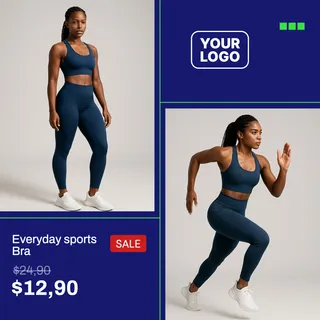
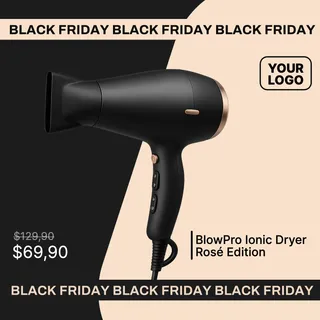
Stop running the same auto-cropped product photos as everyone else. Design catalog ads that actually look like your brand.
Build a template once and Feedr applies it to every product in your feed, rendered in all three creative formats: 1:1 for the feed, 4:5 for portrait placements, and 9:16 for Stories and Reels.
Fully functional template editor
Free Background Removal
Conditionally show/hide elements
Customize Product Feeds
Manage and customize all your product feeds from one platform. Gain complete control and flexibility over all data in your product feeds.
Complete control over product feeds
Mutate & transform product data
Easy data enrichment
Simple and quick quality control
Output fields
Feed ready


Product Filtering
Control how products are distributed across all sales channels using fine-grained filter rules.
Filters are applied on a feed basis and grants you 360° of freedom.
Unlimited filter rules
Exclusion & Inclusion based filtering
Easy overview
Schedule a demo
Want to see how Feedr works and can help your e-commerce or agency?